How Many Cold Emails Should Contractors Send Per Day?
· 6 min read

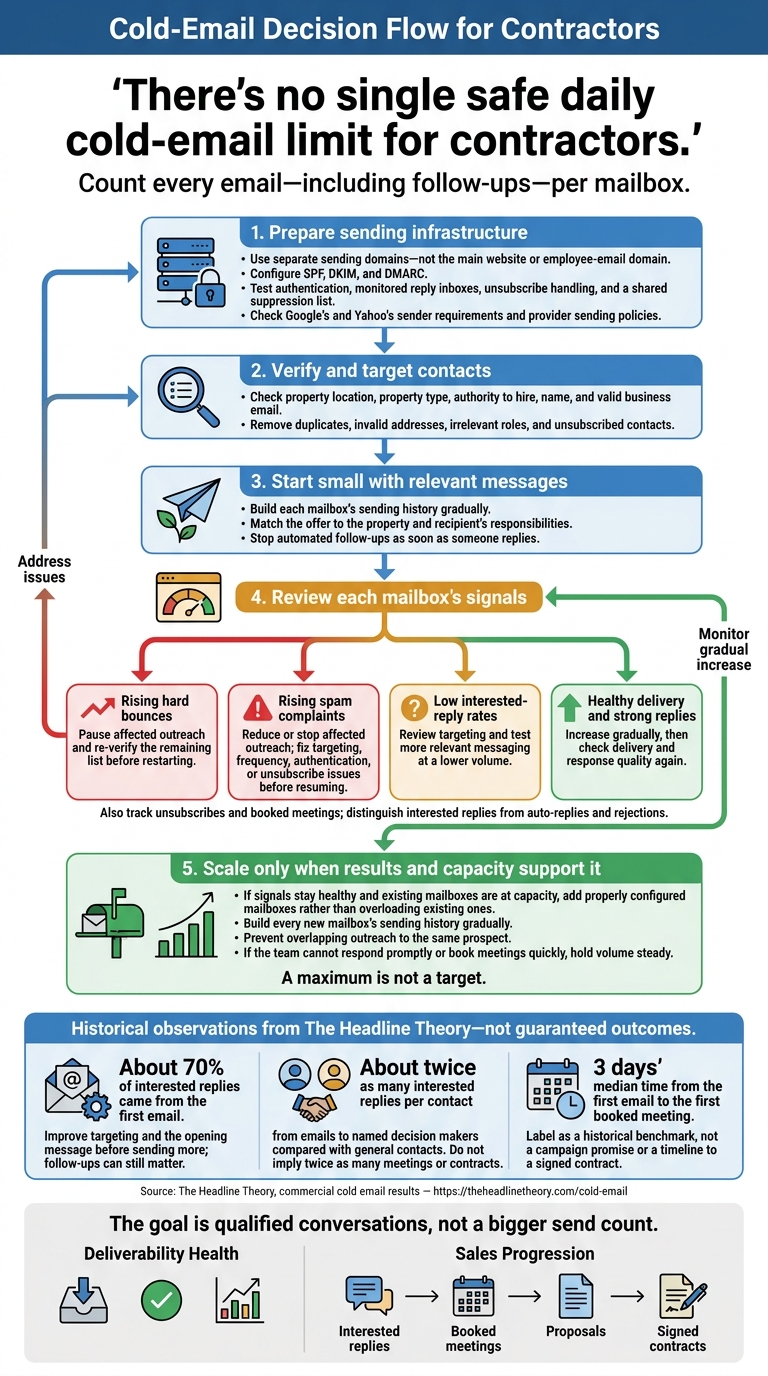
There’s no single safe daily cold-email limit for contractors. Count every email - including follow-ups - per mailbox. Start small, and increase only while bounces and spam complaints stay low and interested replies hold steady.
This article is published by The Headline Theory, which has sent more than 2 million emails for commercial service companies, producing 2,700+ interested replies and 500+ commercial meetings. It reports that about 70% of interested replies came from the first email. That’s a reason to improve targeting and the opening message before sending more - not a guarantee of results.
Before adding volume:
- Set up separate sending domains with SPF, DKIM, and DMARC, and build each mailbox’s sending history gradually.
- Verify contacts, remove poor-fit addresses, honor opt-outs, and stop automated follow-ups when someone replies.
- Check provider rules and track delivery, interested replies, and booked meetings by mailbox.
- Add mailboxes only when results support it and the team can handle more conversations.
The goal is qualified conversations, not a bigger send count.
Prepare Your Sending Domains and Mailboxes
Separate Your Sending Domains and Configure Authentication
Use separate domains for sending - not the domain you use for your main website or employee email. Keep your company name in the sender field and signature, and include your website link. Set up SPF, DKIM, and DMARC for every sending domain.
Before launch, send a test message to check your DNS setup. Make sure replies reach a monitored inbox, unsubscribe requests work, and every mailbox uses the same synced suppression list.
Build Mailbox Sending History Gradually
Once your domain is authenticated, start with a small, verified audience whose responses you can monitor closely. Increase daily volume only when bounce rates stay low and interested replies hold steady. Suppress addresses that hard-bounce, and pause sending to investigate spam complaints.
Follow Google's and Yahoo's Sender Requirements
After setup and warm-up, use Google’s Email sender guidelines, Google’s Email sender guidelines FAQ, and Yahoo’s Sender Requirements as your compliance baseline before increasing volume. Authentication is required, but it doesn’t guarantee inbox placement.
Improve Your Contact List Before Sending More
A smaller, well-targeted list can lead to more qualified conversations than a larger, poorly matched one. Before sending more emails, narrow your audience by service area, property type, and whether the property needs your service. Match your offer to properties you can serve - not just job titles you can find. Every poorly targeted email still counts toward your daily sending load and uses mailbox capacity.
Find and Verify the Right Decision Makers
Check each contact’s property location, property type, authority to hire your service, name, and valid business email. A relevant title isn’t enough. Confirm that the person can hire you for that specific property, and use email verification to screen out invalid addresses.
In The Headline Theory’s commercial cold email results, emails to named decision makers generated about twice as many interested replies per contact as emails to general contacts. That’s an observed result, not a promise that your list will perform the same way.
Write Relevant Messages and Remove Poor-Fit Contacts
Personalize your message around the recipient’s responsibilities, not just their name. Connect your service to the property type, and make clear whether you offer emergency support, planned work, or replacement jobs. Mention availability, scope, or pricing only when you can back up those claims.
In The Headline Theory’s results, about 70% of interested replies came from the first email. That’s a reason to work on your opening message - not to dismiss follow-ups.
Before sending, remove duplicates, invalid addresses, irrelevant roles, and anyone who has already unsubscribed. Set your sequences to stop automated follow-ups as soon as someone replies so you can handle the conversation directly.
Compare interested replies per contact across property and service segments before sending more. Use those results to decide whether to increase volume or tighten your list first.
Increase Sending Volume Only When Results Support It
As list quality improves, increase sending only when mailbox results support it. Look at hard bounces, spam complaints, interested replies, and booked meetings - not just how many emails you send.
The goal isn't more emails. It's keeping each mailbox productive, with interested replies and meetings.
Add Mailboxes Rather Than Overload Existing Ones
When results support more outreach, add properly configured mailboxes and separate sending domains. Build each new mailbox’s sending history gradually rather than starting it at an established mailbox’s volume. Track results by mailbox and domain: a healthy overall average can hide a sender that's struggling.
Check your provider’s limits and sending policies before expanding. A maximum is not a target. Coordinate sends across accounts so the same prospect doesn't receive overlapping outreach.
Adjust Volume Based on Delivery and Replies
Track unsubscribes, hard bounces, spam complaints, interested replies, and booked meetings. Count replies that show interest separately from auto-replies and outright rejections.
| Signal | Action |
|---|---|
| Rising hard bounces | Pause affected outreach and re-verify the remaining list before restarting. |
| Rising spam complaints | Reduce or stop affected outreach. Fix targeting, frequency, authentication, or unsubscribe issues before resuming. |
| Low interested-reply rates | Review targeting and test more relevant messaging at a lower volume. |
| Healthy delivery and strong replies | Increase gradually, then check delivery and response quality again. |
If these signals stay healthy and existing mailboxes are at capacity, add configured mailboxes instead of sending more from each one.
If you can't respond promptly or book meetings quickly, hold volume steady. Focus on turning interested replies into booked meetings.
Conclusion: Measure Opportunities, Not Emails Sent
Before sending more emails, measure deliverability and sales results separately. Watch bounces and spam complaints to protect your reach. Then track interested replies through booked meetings, proposals, and signed contracts.
The Headline Theory’s median time from the first email to the first booked meeting was 3 days. Use that as a historical benchmark - not a promise for your campaign or a timeline for landing a contract.
For channel planning, see cold calling vs. cold email for commercial contractors to help decide where each channel fits in your outreach.
Your daily sending limit should reflect how many emails you can send while keeping mailboxes healthy and generating qualified commercial conversations.
FAQs
How can you find your mailbox’s safe sending limit?
Start with a controlled “ramp test”: send a small number of emails each day to real, verified addresses. Then gradually increase your daily volume while tracking bounce rates and spam-complaint risk. New or misconfigured mailboxes and domains can run into delivery problems that take time to fix.
Keep SPF, DKIM, and DMARC set up correctly, warm up new mailboxes, and keep your contact list up to date. Higher bounce rates can damage your sender reputation fast.
How can you tell if cold emails reach spam?
Watch bounce rates and reply activity for warning signs. A rising bounce rate or a sudden drop in replies can point to a declining sender reputation, often tied to outdated contact data that needs to be reverified.
Measure results by interested replies and meetings, not how many emails you send. If your emails stop reaching inboxes, your pipeline drops with them, and a damaged sender reputation can take time to recover.
How often should you follow up with property managers?
Follow up only when your previous email gets no reply, not on a fixed schedule. Keep the sequence short: about 70% of interested replies come from the first email.
Across The Headline Theory's campaigns, the median time from the first email to the first booked meeting was 3 days, so reply quickly when someone responds. Track interested replies, meetings, and signed contracts - not just how many emails you send.
Related posts
One company per service area. See if yours is still open.